New Customer Onboarding
Prism Customer Success Handbook — Section 3.6 · Type: Lifecycle
⚠️ Not yet built. No Lifecycle-type playbook exists in the CSP — the engine currently implements the five Risk and Opportunity playbooks only. This page defines the target process; it is scoped in
BUILD_BACKLOG.mdfor the Prism v2 push. Until then, onboarding runs as documented process rather than tracked playbook.
Trigger
Fires on a completed Sales → CS handoff (2.1 Sales → CS Handoff Standard) — not on contract signature.
Why the handoff, not the signature
The handoff checklist is gated before closed-won, so tying the playbook to signature would let an incomplete handoff silently start an onboarding clock. Every early task in this playbook consumes handoff inputs — success criteria sold, named implementer, credentials owner. Starting without them means the first week is spent reconstructing what Sales already knew.
If the handoff is incomplete, the playbook still opens and enters a hold state on its first task. The CSM either gets the gaps filled or proceeds and logs the deficiency — never delaying the customer to win an internal process argument (2.11 Exception Handling). The hold makes the cost visible rather than absorbed silently by CS.
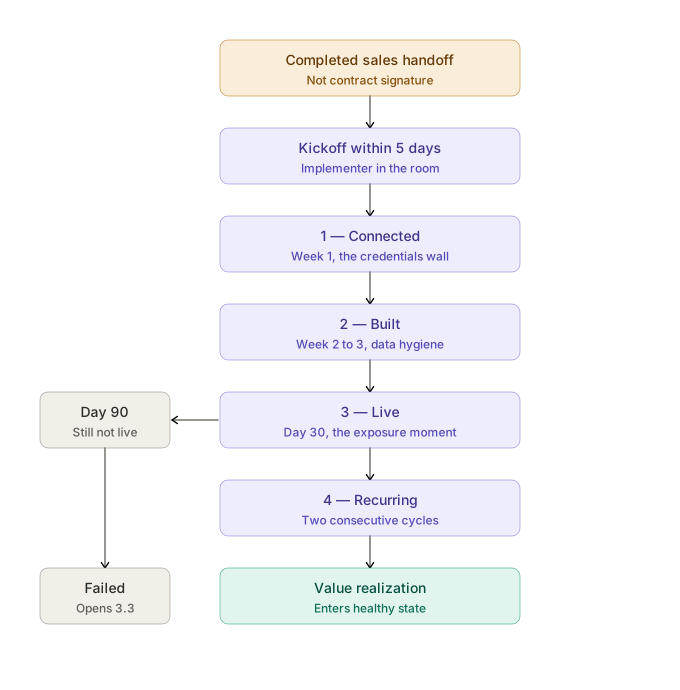
Structure: milestone-driven, time-nudged
The playbook tracks which of the four adoption milestones is open (1.7 Success Plans). Elapsed time against each milestone's target is what escalates intervention.
| Milestone | Target | Open past target → |
|---|---|---|
| 1 — Connected | Week 1 | Day 10 nudge; day 21 escalate to practice lead |
| 2 — Built | Week 2–3 | Day 30 working session or template push |
| 3 — Live | Day 30 | Day 45 pilot-client recommendation; day 60 escalate |
| 4 — Recurring | Day 60–90 | Day 90 confidence-path conversation |
Why not a time-boxed day 30 / 60 / 90 playbook. A purely calendar-driven onboarding marches through checkpoints regardless of where the account actually is — generating a "day 60 adoption review" task for an account still stuck on credentials, which is worse than useless because it makes the process look like it's working while nothing moves. Milestones are the spine; the calendar is the alarm clock.
Objective
Get the account to Value Realization — all four milestones complete — with the relationship and knowledge structure to survive afterward.
Owner
CSM. SE for Enterprise integration work; Support for break-fix (2.5 Cross-Functional Interfaces).
Entry criteria
- Sales handoff received (complete or in hold state), and
- Account has no prior onboarding playbook
Procedure
Stage 0 — Before kickoff
Review the handoff (2.1 Sales → CS Handoff Standard). Extract: success criteria sold in the customer's words, named implementer, credentials owner, whether an SE is scoped, known risks.
Front-load the credentials ask. Name the access needed in the pre-kickoff email so the right person can be pulled in early. This single step prevents the most common stall in the entire lifecycle — the credentials wall is an org-chart problem, and org-chart problems take weeks to resolve if you start them late (1.5 Customer Journey Map).
Stage 1 — Kickoff
Within 5 business days of handoff. Format and required output in 2.2 Meeting Standards & Working Norms.
The non-negotiable element: restate the success criteria sold, out loud, with the implementer present. The buyer heard one thing in the sales process; the person now doing the work heard none of it. Half an hour here closes the demo gap before it opens.
Three questions that must be answered before the meeting ends:
- "What does your client data look like today — one system or several, and is client naming consistent?" Surfaces the data-hygiene burden on day one instead of week two.
- "Who owns admin access to those systems, and have they been told this is coming?" The credentials question, asked before it becomes a blocker.
- "Who's doing this work, and how much time do they actually have?" An implementer with a full client load is normal — a plan built assuming dedicated time will slip and then feel like failure.
Set the sequence against the real answer to question 3, not the ideal one.
Stage 2 — Milestone 1: Connected
The customer connects their first data source. We provide setup documentation by source type (2.9 Customer Education & Enablement).
If it stalls: escalate to the practice lead, never the credential holder directly. The credential holder doesn't report to the buyer and has no stake in the project — pressure on them rarely works and can damage the relationship with the person who actually bought.
Hard threshold: credentials unresolved past 45 days is a stalled onboarding (2.11 Exception Handling). No implementer ever named past 30 days flags the account At-Risk regardless of health score — there is no path to value without someone to walk it.
Stage 3 — Milestone 2: Built
First dashboard published. Templates do most of the work here (2.9 Customer Education & Enablement) — the goal is configuration, not construction.
Expect data hygiene to surface now. Internal shorthand field names, the same client named three ways across systems. This is unbudgeted work from the customer's perspective and it's the point where enthusiasm dips. Naming it as normal — "everyone hits this, here's the fastest path through" — is worth more than another tutorial.
Stage 4 — Milestone 3: Live (the critical one)
First end client has portal access and has logged in. This is the value moment, and the milestone where most failed onboardings actually die.
The blocker is rarely capability. It's the exposure moment (1.5 Customer Journey Map, stage 3): putting a dashboard in front of a client makes the firm's work visible in a new way, and if the numbers are unflattering or the data is wrong, that's a client conversation nobody wants. Perfectly rational hesitation that reads externally as slow adoption.
What actually moves it:
- Recommend a specific pilot client. Not their largest or most demanding — one with a strong, forgiving relationship and reasonably clean data. Making the hardest decision for them, as a recommendation they can accept or override, removes the stall.
- Provide the "what to say to your client" script so the AM isn't improvising change management.
- Ask about branding approval early. The portal is customer-facing, so marketing often has opinions. Discovering that as a blocker at week 4 costs weeks.
The diagnostic question when this stalls is not "are you still interested?" It's "what would make you comfortable putting this in front of a client?" — the first assumes indifference, the second addresses the actual fear.
Stage 5 — Milestone 4: Recurring
Scheduled delivery running to at least one end client for two consecutive cycles.
Offer a confidence path, not a switch: manual review for the first send, spot-check the second, unattended by the third. The first unattended send is the highest-anxiety moment in the relationship — something goes to their client, under their brand, with no human checking it. Firms that cope by reviewing every send forever have preserved the anxiety and eliminated the time savings that justified the purchase.
Verify the second consecutive send, not just the first. One successful send proves the mechanism; two prove it's been accepted.
Stage 6 — Close out and hand into steady state
Before closing, three things that determine whether the account survives its first year:
- Get the practice lead onto the portal at least once. A buyer who has never seen the product they bought is a renewal risk regardless of how well it's working (1.5 Customer Journey Map, stage 4).
- Start the value record. Capture hours saved, reports delivered, what the old process cost — while the AMs still remember. At renewal, nobody will have been counting.
- Ask who else knows how this is set up. If one person built everything, push for a second trained user. This is Champion Departure prevention, executed before there's a departure (3.4 Champion Departure).
Then: create the success plan (Mid-Market and Enterprise, 1.7 Success Plans), confirm the stakeholder map, and set the ongoing cadence per segment (2.2 Meeting Standards & Working Norms).
Segment differences
The milestones and their order are identical for every segment. Only the resources differ.
| SMB | Mid-Market | Enterprise | |
|---|---|---|---|
| Kickoff | Yes — the one live meeting SMB always gets | Yes | Yes, with SE |
| Milestone support | Content-led: automated sequence, templates, scripts | CSM-led working sessions | CSM + SE for integration, security review |
| Stall response | Milestone-triggered nudge, then one direct email | CSM call | CSM plus practice-lead engagement; SE if technical |
| Close-out | Standardized path complete; no success plan | Success plan created | Success plan created; IT relationship established |
SMB gets a kickoff despite tech-touch coverage because skipping it means the demo gap and buyer≠implementer problems go undetected on precisely the accounts with the least ongoing attention to catch them later (2.2 Meeting Standards & Working Norms).
Templates
Full versions in 4.1 Email Template Library. The milestone-triggered sequence (2.9 Customer Education & Enablement) fires on both completion and non-completion — the non-completion nudge is the only mechanism that reaches a silently stalling SMB account before the health model has enough history to flag anything.
Pre-kickoff (credentials front-load)
Email template
Subject: Before we kick off — one thing to line up
Hi [name] — looking forward to Thursday. One thing that'll save us a week: connecting your first data source needs admin access to [system]. In most firms that sits with someone outside the team using Prism, which is usually why it's the step that stalls.
If you can find out who owns that before we talk, we can plan around their availability rather than discovering it later.
Milestone 3 nudge (built, not live)
Email template
Subject: Getting your first client into the portal
Hi [name] — [dashboard name] looks good, which is the hard part done. The step that turns it into something your clients notice is getting one of them into the portal.
Most firms start with a client they have a strong relationship with rather than their biggest one — takes the pressure off the first run. I've attached what other firms say when they introduce it.
Want me to help you pick one?
Escalation path
Escalate (2.7 Escalation Management) when:
- No implementer named past 30 days (2.11 Exception Handling)
- Credentials unresolved past 45 days (2.11 Exception Handling)
- Milestone 3 still open at day 60
- The account is Enterprise and any milestone is more than 30 days past target
- The customer skipped kickoff and has gone quiet — the risk mitigations were never in place
Exit criteria
Close when one of:
- Value Realization reached — all four milestones complete, practice lead has seen the product, value record started, second person aware of the setup. Account enters the Healthy state (1.4 Customer Lifecycle).
- Failed — day 90 with milestone 3 still open. Onboarding closes as failed and Low Adoption (3.3 Low Adoption) opens.
Why onboarding gets a failure boundary
Without one, an onboarding playbook stays "active" for eight months on an account that plainly stalled — which looks like work in progress and is actually a stall nobody named. Closing it as failed does two useful things: it routes the account to a playbook actually designed for diagnosing stalls, and it makes onboarding failure a countable event rather than an indefinite open task.
The 30/45/60-day thresholds above still fire earlier and independently — the day-90 boundary is the backstop, not the first alarm.
What does not count as resolution
- Milestones 1 and 2 complete. Dashboards built and never shown to a client is the canonical failure for this product, not partial success (3.3 Low Adoption).
- "They're set up, they'll get going soon." If nobody has scheduled the next step with a date, the account is stalled and the language is optimism.
- Access granted to an end client who never logged in. Milestone 3 requires an actual login — access provisioned and unused is not value delivered.
- One successful scheduled send. Milestone 4 requires two consecutive cycles.
Related pages
- 1.5 Customer Journey Map — the friction behind every stall in this playbook
- 1.7 Success Plans — the four milestones and the plans created at close-out
- 2.1 Sales → CS Handoff Standard — the trigger and its hold state
- 2.2 Meeting Standards & Working Norms — kickoff format and required outputs
- 2.9 Customer Education & Enablement — the milestone-triggered sequence and templates
- 2.11 Exception Handling — implementer, credentials, and skipped-kickoff policy
- 3.3 Low Adoption — where a failed onboarding routes
- 3.4 Champion Departure — the knowledge-concentration risk addressed at close-out