Expansion Opportunity
Prism Customer Success Handbook — Section 3.5 · Type: Opportunity
Trigger
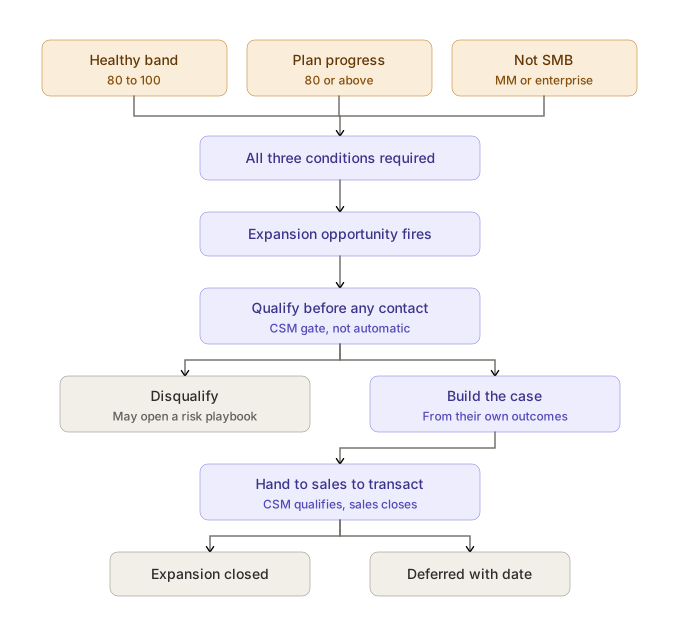
Fires automatically when all three conditions are true (lib/health/triggers.ts):
- Composite health is in the Healthy band (80–100)
- Success Plan Progress is 80 or above
- Segment is not SMB — Mid-Market or Enterprise only
Why the trigger is built this way
Three conditions joined by AND — the only playbook built this way. Every Risk playbook fires on an OR of independent paths, deliberately over-triggering because a false positive costs an unnecessary check-in while a false negative costs an account. Opportunity inverts that: a false positive here costs credibility with the customer. An expansion approach to an account that's quietly frustrated damages the relationship in a way no risk false-positive can. Conservative triggering is the correct asymmetry.
Success Plan Progress is the gate, not usage volume — and that's the most interesting decision in this playbook. Expansion is triggered by the customer achieving what they said they wanted, not by us noticing they're approaching a limit. Those are different philosophies: one earns the conversation with delivered outcomes, the other extracts it from consumption mechanics. The first also makes the business case trivial to write, because the evidence already exists in the success plan.
The SMB exclusion is explicit rather than incidental. Under the target model (1.6 Health Scoring Methodology), Success Plan Progress doesn't apply to SMB at all — so the second condition could never be satisfied there anyway. The explicit segment check states the intent rather than relying on that data quirk, which means the trigger still behaves correctly if the scoring model changes.
The gap this creates, named honestly
SMB expansion is never automatically surfaced. SMB accounts do expand — more client workspaces, more seats — but nothing in the system flags it, so it happens only when the customer asks. That's a deliberate consequence of tech-touch coverage and success-plan gating, and it's also a real revenue gap.
The v2 fix, if it's worth building, isn't extending this trigger to SMB — it's a different signal appropriate to that segment: usage depth against entitlement (workspaces or seats approaching what they bought). That's consumption-based rather than outcome-based, which is the right shape for accounts with no success plan. Logged as a v2 consideration, not scoped.
Objective
Convert a demonstrably successful account into a larger one, on the strength of outcomes already delivered.
Owner
CSM identifies and qualifies. Sales transacts. The handoff point is when the customer confirms interest in a commercial conversation (2.5 Cross-Functional Interfaces).
Entry criteria
- All three trigger conditions met, and
- No Expansion Opportunity playbook already active (dedupe, 3.0 Playbook Index), and
- Outside the 30-day cooldown
Procedure
1. Qualify before any customer contact
This playbook is gated: the trigger surfaces a candidate, the CSM decides whether it's real (3.0 Playbook Index). No automated outreach, ever.
The score says the data looks good. The CSM knows things the data doesn't. Before contacting anyone, check:
- Open escalations, or one recently closed? An account two weeks past a P1 is not an expansion conversation, however healthy the composite looks.
- Recent support pain not yet reflected in a lagging aggregate?
- Renewal proximity — see step 5.
- Is the champion stable? Expanding into a relationship about to lose its advocate is wasted effort.
- Did anything happen on their side — reorg, budget freeze, client loss — that the CSM heard about but nothing recorded?
If qualification fails, dismiss the playbook with a reason. If the reason is that the account is actually in trouble, open the relevant Risk playbook. A dismissed expansion that reveals a hidden risk is this playbook doing useful work.
2. Identify what the expansion actually is
For Prism, expansion takes three named forms:
| Motion | What it is | Signal it's the right one |
|---|---|---|
| More client workspaces | They're serving more of their client book through Prism | Workspace count growing steadily; AMs asking about adding clients |
| More seats | More of their team using it | Provisioned users approaching purchased seats; new AMs onboarding |
| Insights attach | The alerting and anomaly-detection module (MM/Enterprise) | They're manually watching for metric changes, or asking about being notified |
Name which one before the conversation. "Would you like to expand?" is not a conversation; "You've got twelve clients on the portal now and your team is asking about the next ten — should we talk about what that looks like?" is.
3. Build the case from their own outcomes
The success plan is the evidence base. That's why the trigger gates on it.
Assemble: objectives they stated, outcomes delivered against them, what that's been worth in their terms — hours saved, clients retained, a tool retired. Then frame the expansion as the next objective, not the next SKU.
The framing error to avoid: leading with our product catalog. An expansion conversation that opens with what else Prism sells puts the customer in a purchasing frame. One that opens with what they've achieved and what's next keeps them in an outcomes frame — where the expansion is their idea as much as ours.
4. Find the stakeholders this needs
Expansion frequently requires people the current relationship doesn't include: a different team's lead, a budget holder for a larger number, IT for a broader integration. The champion who drove the original adoption may not have authority for the expanded footprint.
Identify who signs off on a bigger number before building enthusiasm with someone who can't approve it.
5. Decide the timing relative to renewal
A genuine tradeoff, named rather than decided by default:
- Bundling expansion with renewal means one negotiation, one approval cycle, and a natural moment for a budget conversation.
- But it converts a renewal into a purchase decision. The customer now has two things to say yes to instead of one, and procurement scrutiny that a flat renewal would have avoided.
Default: keep them separate, and run expansion off-cycle. A renewal that becomes an upsell negotiation is a renewal carrying more risk than it needs to. The exception is when the customer initiates the bundling themselves, or when their budget cycle genuinely only opens at renewal — in which case bundle deliberately and expect the renewal to take longer.
6. Hand to Sales
When the customer confirms interest in a commercial conversation, Sales owns pricing, proposal, and close (2.5 Cross-Functional Interfaces). The CSM stays in the relationship and stays informed — this is a handoff of the transaction, not of the account.
Brief Sales properly: the outcomes evidence, the stakeholders, what was discussed, what's already been implied about scope. An AE walking in cold undoes the qualification work.
Templates
Full versions in 4.1 Email Template Library.
Expansion conversation opener (workspaces)
Email template
Subject: Your next set of clients on the portal
Hi [name] — looking at where things stand: [N] of your clients are live on the portal, reports have been going out on schedule since [month], and we closed out [stated objective] from your success plan.
Your team has mentioned wanting to bring on [more clients / another group]. Worth a conversation about what that looks like — I'd rather understand what you're planning than send you a price list.
Insights attach opener
Email template
Subject: You're watching for this manually — worth automating?
Hi [name] — you mentioned checking [metric] across your client dashboards before your monthly calls. That's exactly what Insights does automatically: it flags the change and tells you before the client notices.
Happy to show you what it'd look like against your actual data rather than a demo account.
Both open with evidence from their account. Neither mentions pricing — that's Sales' conversation, after they've said they're interested.
Escalation path
Escalation in the sense of 2.7 Escalation Management doesn't apply here. Escalation is a response to something going wrong; this playbook exists because something is going right. There's no comms cadence to breach and no crisis to coordinate.
What this playbook has instead is a routing handoff to Sales (step 6), which is a transfer of ownership rather than an escalation.
Two situations do warrant pulling in the Director of CS (2.5 Cross-Functional Interfaces):
- The expansion is large enough to need non-standard commercial terms
- Qualification reveals the account is actually at risk — in which case this playbook is dismissed and a Risk playbook opened, which follows its own escalation path
Exit criteria
Close when one of:
- Expansion closed — Sales transacted it. The account continues in the Healthy state with a larger footprint (1.4 Customer Lifecycle).
- Disqualified, with a recorded reason. Legitimate outcomes include: not the right time, no budget this cycle, hidden risk surfaced.
- Deferred with a specific revisit date — the opportunity is real but the timing isn't. A date, not "later."
What does not count as resolution
- "That sounds interesting." The most common false positive in expansion work. Interest is not intent; the test is whether they'll take a commercial conversation.
- A proposal was sent. Sending is an activity. A decision — yes, no, or not now — is the outcome.
- Deferred indefinitely. Without a revisit date, a deferred expansion is a forgotten one. The cooldown will re-fire the trigger eventually, but that's the system compensating for a process gap, not the process working.
- The account renewed. Renewal is not expansion. Closing this playbook because a renewal happened conflates retention with growth.
Related pages
- 1.4 Customer Lifecycle — Expansion as a recurring process, not a state
- 1.6 Health Scoring Methodology — the bands and category this trigger reads
- 1.7 Success Plans — the evidence base the business case is built from
- 2.4 Account Prioritization Framework — why expansion sits below retention work
- 2.5 Cross-Functional Interfaces — the CSM-identifies / Sales-transacts split
- 2.10 Advocacy Program — successful expansion as an advocacy moment
- 3.0 Playbook Index — why Opportunity playbooks are gated before customer contact
- 3.7 Renewal Motion — the timing tradeoff in step 5