Low Adoption
Prism Customer Success Handbook — Section 3.3 · Type: Risk
Trigger
Fires automatically when Product Adoption score falls below 40 (lib/health/triggers.ts).
Why the trigger is built this way
A raw threshold, not a band crossing. Unlike Health Decline (3.1 Health Decline), which fires on the transition into Watch List, this fires whenever the score sits below 40. The cooldown (3.0 Playbook Index) is what prevents it re-firing endlessly on a chronically low account — once every 30 days rather than every week.
Worth naming as an inconsistency: two playbooks use two different mechanisms for a similar job. It's defensible — a chronically unadopted account genuinely does warrant periodic re-examination in a way that a chronically mediocre composite score does not, because adoption is the thing value depends on. But if the quarterly system review (2.3 Operating Rhythm) shows this playbook re-firing on the same accounts indefinitely without progress, the honest fix is a crossing-based trigger plus a separate "chronically unadopted" treatment, not a longer cooldown. (Logged as a v2 consideration.)
No segment differentiation in the trigger — deliberate. Product Adoption is weighted very differently by segment (55% SMB, 20% Enterprise per 1.6 Health Scoring Methodology), so the same score of 35 damages an SMB composite far more than an Enterprise one. But the playbook fires identically everywhere, because adoption failure is adoption failure: an Enterprise account that never got a client onto the Portal has failed to reach value regardless of what the weighted composite says. The segment difference belongs in the response, not the trigger — see the procedure.
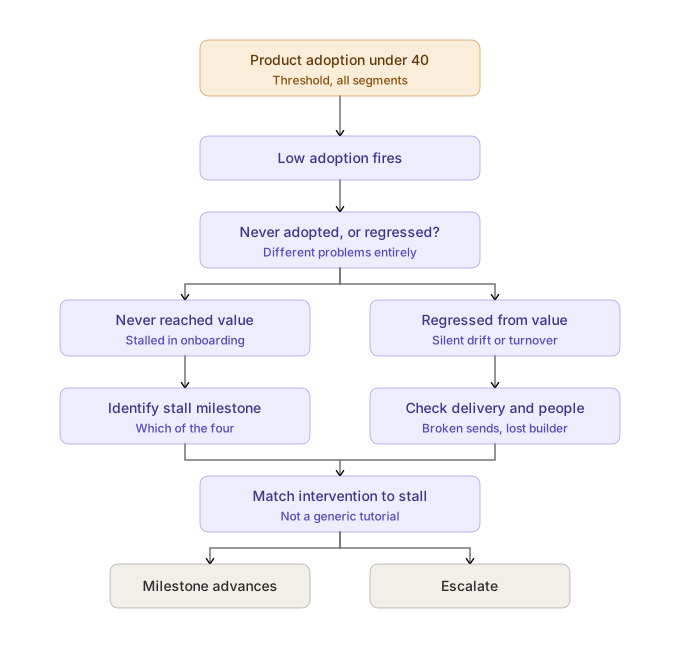
Under the target model (1.6 Health Scoring Methodology), Product Adoption is 50% milestone progress and 50% usage recency. A score under 40 therefore means one of two structurally different situations, and step 1 exists to tell them apart.
Objective
Identify which adoption milestone the account is stalled at, and remove what is actually blocking it.
Owner
CSM. SE joins where an Enterprise integration is the blocker (2.5 Cross-Functional Interfaces).
Entry criteria
- Product Adoption below 40, and
- No Low Adoption playbook already active (dedupe, 3.0 Playbook Index), and
- Outside the 30-day cooldown
Procedure
1. Establish: never adopted, or regressed?
These are different problems and conflating them is the most common mistake this playbook prevents.
| Never reached value | Regressed from value | |
|---|---|---|
| What it means | The account never completed the four milestones (1.7 Success Plans) — it stalled during onboarding and has been quietly stalled since | The account reached Value Realization and has since declined — usage stopped, sends are failing, or the people left |
| Where to look | Milestone history: which one is still open | Delivery logs, activity history, contact changes |
| What it usually is | A structural blocker nobody escalated | Silent drift or turnover (1.5 Customer Journey Map, stage 5) |
An account that never reached value doesn't need re-engagement — it needs its original blocker removed, possibly months late. An account that regressed had it working once, which means something specific changed.
2a. If never adopted — identify the stall milestone
The milestone tells you the problem. This mapping is the core of the playbook:
| Stalled at | What's actually wrong | Intervention |
|---|---|---|
| Before 1 — Connected | The credentials wall. Someone outside the project holds admin access and has no stake in it. | Escalate to the practice lead, not the credential holder (2.11 Exception Handling). This is an org-chart problem, not a technical one. |
| 1 → 2 — Built | Data hygiene work they didn't budget for, or the implementer has no time. | Templates to cut build effort (2.9 Customer Education & Enablement); a sequencing conversation with the practice lead if it's time. |
| 2 → 3 — Live | The exposure moment. Dashboards exist; no end client has ever seen one. Rational fear of showing a client something imperfect. | Recommend a specific safe pilot end client. Provide the "what to say to your client" script. This is reassurance and a decision made easier — not a tutorial (2.9 Customer Education & Enablement). |
| 3 → 4 — Recurring | They don't trust unattended delivery and are hand-checking every send. | The confidence path: manual review → spot-check → unattended (1.5 Customer Journey Map, stage 4). |
The 2 → 3 stall is the canonical adoption failure for this product. The account looks busy — dashboards built, people logging in — while no end client has ever received anything. Brightpath is exactly this: a composite of 63 in the Stable band, Product Adoption at 31, and no portal client. The composite alone would never surface it; this playbook does.
2b. If regressed — find what changed
Check, in order:
- Delivery failures — did scheduled sends start failing? A source schema changed, a credential expired. This is silent drift, and it may mean their end clients have already noticed something wrong.
- People — did the person who built everything leave? Champion departure is an operational knowledge problem as much as a relationship one (1.5 Customer Journey Map). If so, run 3.4 Champion Departure alongside this.
- Their business — did they lose the end clients the reports served? Sometimes declining usage is an accurate reflection of their situation, not a failure of ours.
3. Diagnose before intervening
Do not send a tutorial at a structural problem. An account stalled on credentials that receives a how-to guide learns that Prism isn't paying attention (2.9 Customer Education & Enablement). Match the intervention to the stall — the tables above exist so this is a lookup, not a guess.
4. Segment the response, not the diagnosis
The problem is the same everywhere; the resources differ:
- SMB — content-led. Template, script, milestone nudge. This may be the first live contact in months (2.2 Meeting Standards & Working Norms), and that's the model working as designed. One well-aimed email beats a call that never gets scheduled.
- Mid-Market — CSM-led. A working session on the specific blocker.
- Enterprise — pull in the SE if the blocker is technical (2.5 Cross-Functional Interfaces); engage the practice lead directly if it's organizational. Enterprise stalls are more often about stakeholder alignment than capability.
5. Agree a next milestone with a date
The output is one specific next step toward one specific milestone, with an owner and a date. Not "we'll help you get more value." An adoption conversation that ends without a named milestone target has not moved the account.
Templates
Full versions in 4.1 Email Template Library.
Stalled at 2 → 3 (built but not live)
Email template
Subject: Getting your first client into the portal
Hi [name] — I can see you've built [dashboard name], which is the hard part. The step that turns it into something your clients notice is getting one of them into the portal.
Most firms start with a client they have a strong relationship with rather than their biggest one — it takes the pressure off the first run. If it's useful, I've attached what other firms say to their clients when they introduce it.
Want me to help you pick one?
Stalled before 1 (credentials)
Email template
Subject: Getting [source system] connected — who owns access?
Hi [name] — we're still waiting on access to [system] to get your first data source connected. In most firms this sits with someone outside the team using Prism, which is usually why it stalls.
Who owns admin access there? Happy to join a short call with them to explain exactly what's needed — it's usually a 15-minute conversation.
Both templates name the specific milestone and the specific blocker. A generic "let's boost your adoption" email is worse than no email.
Escalation path
Escalate (2.7 Escalation Management) when:
- No implementer has ever been named — 30-day threshold (2.11 Exception Handling). There is no path to value without someone to walk it.
- Credentials unresolved past 45 days (2.11 Exception Handling)
- The account is inside the renewal window — low adoption plus a renewal deadline is P2 in triage (2.4 Account Prioritization Framework)
- Stacked with Health Decline or Champion Departure — Risk Level is Compounding (1.6 Health Scoring Methodology). Apex Labs is the case in point.
Exit criteria
Close when one of:
- A milestone advanced — the account moved forward and the specific blocker is gone
- The blocker is identified as outside our control, recorded honestly, with the account's status set accordingly — their reorg, their client loss, their budget freeze
- Escalated and now owned by that process
What does not count as resolution
- The score ticked up. A brief usage spike is not adoption. Milestone progress is.
- A training session happened. Delivering enablement is an activity; the milestone advancing is the outcome. An account can attend three sessions and still never put a client on the Portal.
- "We'll get to it next quarter." Common, and usually means the structural blocker is still there and unnamed. Ask what specifically would need to be true — the answer is the real blocker.
- Login activity resumed. People logging in to build dashboards nobody's client sees is precisely the Brightpath failure. Milestone 3 is the line.
Related pages
- 1.5 Customer Journey Map — the friction behind every stall in the table above
- 1.6 Health Scoring Methodology — Product Adoption composition and segment weighting
- 1.7 Success Plans — the four milestones this playbook drives toward
- 2.9 Customer Education & Enablement — content, and when education is the wrong intervention
- 2.11 Exception Handling — implementer and credentials thresholds
- 3.1 Health Decline · 3.4 Champion Departure — playbooks this commonly stacks with
- 3.6 New Customer Onboarding — the lifecycle playbook that should prevent most of these