Health Decline
Prism Customer Success Handbook — Section 3.1 · Type: Risk
Trigger
Fires automatically when either condition is true (lib/health/triggers.ts):
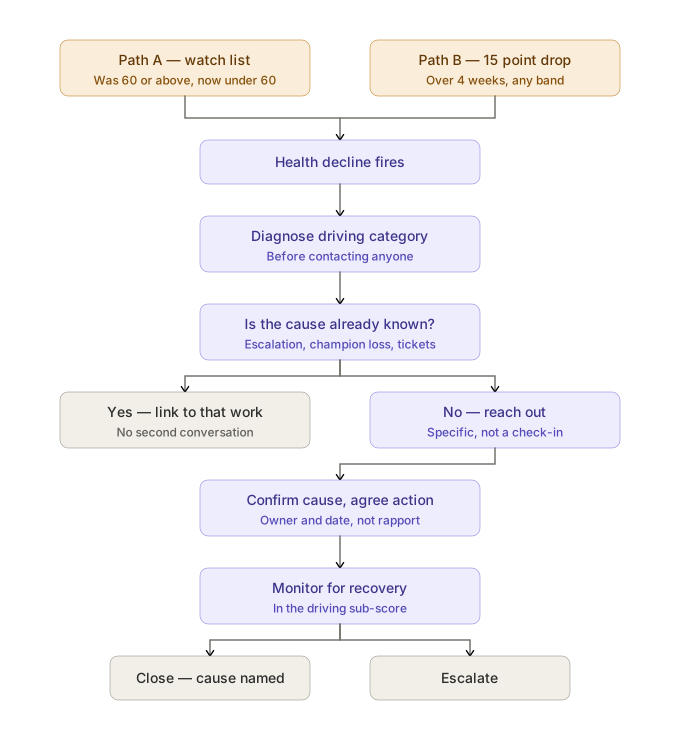
A — Entered Watch List. The previous snapshot's composite was 60 or above and the current snapshot is below 60.
B — Dropped 15+ points in 4 weeks. The current composite is at least 15 points below the composite from exactly four snapshots earlier (weekly cadence).
Why the trigger is built this way
Condition A is a band crossing, not a threshold test. It fires on the transition into Watch List, not every week the account sits below 60. A threshold test would re-fire indefinitely on an account that's been at 55 for a year, and the CSM would learn to ignore it. The crossing is the event; the sustained low score is a state, handled by prioritization (2.4 Account Prioritization Framework) rather than by repeatedly re-alerting.
Condition B catches the slide that never crosses a band. An account moving 88 → 71 stays in the Stable band the whole way and is invisible to any threshold filter — but it has lost 17 points in a month, and that's the more urgent story. This is the trigger-level implementation of the principle in 2.3 Operating Rhythm: look at what moved, not just what's low.
Condition B can therefore fire while the composite is still comfortably above 60. That's intended. The account enters the At-Risk state via the active-playbook condition (1.6 Health Scoring Methodology) despite a healthy-looking score — the same mechanism that catches Brightpath.
Known limits of the trigger, stated honestly:
- Condition B requires at least five snapshots, so accounts under ~5 weeks old cannot fire it. Early-stage accounts are covered instead by the weekly onboarding attention rule (2.3 Operating Rhythm).
- Condition B compares against exactly four snapshots prior, not the maximum over the window. An account that dropped sharply and partially recovered may not fire.
- The trigger is not segment-differentiated: a 15-point drop is treated identically for SMB and Enterprise. Defensible — a 15-point move is meaningful at any size — but worth revisiting at the quarterly system review if it produces noise at one end of the book.
Objective
Understand why health declined, and either correct the cause or accept it with eyes open.
Owner
CSM. Support, SE, or Product join as resolvers depending on cause (2.5 Cross-Functional Interfaces).
Entry criteria
- Trigger condition met, and
- No Health Decline playbook already active on the account (dedupe, 3.0 Playbook Index), and
- Outside the 30-day cooldown from a previously completed Health Decline playbook
Procedure
1. Diagnose before contacting
Do not reach out until you know which category drove the drop. Open the health snapshot history and identify what moved: Product Adoption, Support Experience, Stakeholder Engagement, or Success Plan Progress.
This step exists because the alternative is the single weakest move in customer success — the generic "just checking in" email. It signals that we noticed a number changed and know nothing else, it asks the customer to do the diagnostic work for us, and it very often gets no reply. The customer's time is spent explaining their own account back to us.
Each category implies a completely different conversation:
| What dropped | Likely cause | The conversation |
|---|---|---|
| Product Adoption | Usage stalled, milestone regression, scheduled sends failing | What changed in their workflow? Did something break, or did priorities move? |
| Support Experience | P1/P2 incidents, slow resolution, reopens | An apology and a status account — not a check-in |
| Stakeholder Engagement | Contact gone quiet, champion unresponsive, thread narrowed | Who's still here? Has something changed on their side? |
| Success Plan Progress | Goals slipping, plan gone stale | Are these still the right objectives, or has their business moved? |
2. Check whether the cause is already known
Look for an active escalation, a recent champion departure, a support pattern, or a known product issue. If the decline is a symptom of something already being worked, do not open a second parallel conversation with the customer — note the link and let the existing workstream own it. Two CSM contacts about the same problem reads as disorganization.
3. Form a hypothesis and reach out with it
Contact the account with a specific observation, not a general one. "I noticed your scheduled reports to two clients stopped going out three weeks ago — did something change on your end?" gets a reply. "How's everything going?" does not.
Being wrong is fine and often useful — a customer correcting your hypothesis tells you more than an open question, because they're responding to something concrete.
Segment note: for SMB, this may be the first live contact in months (2.2 Meeting Standards & Working Norms). That's expected — it's exactly what exception-based coverage is for.
4. Confirm the cause and agree an action
The output of the conversation is a named cause and an agreed action with an owner and a date — theirs or ours. A pleasant call that ends with "great, let's stay in touch" has not resolved anything.
Where the cause is a product gap, route it to Product with context (2.8 Voice of Customer & Product Feedback). Where it's a support problem, verify Support has it and whether it warrants escalation (2.7 Escalation Management).
5. Update the record
- Log the conversation with substance (2.2 Meeting Standards & Working Norms)
- Update forecast category if the cause changes the renewal picture (2.6 Renewal Forecasting)
- Update the success plan if objectives shifted (1.7 Success Plans)
- Escalate if the situation warrants (below)
6. Monitor for recovery
Health is snapshotted weekly. Watch subsequent snapshots for the category that dropped — recovery in that specific sub-score is the evidence the action worked. Recovery in the composite alone, without the driving category improving, is not.
Templates
Full versions in 4.1 Email Template Library.
At-risk check-in (adoption-driven)
Email template
Subject: Your scheduled reports to [client name]
Hi [name] — I was reviewing your account and noticed the scheduled reports to [client/workspace] stopped going out around [date]. I wanted to check whether something changed on your side, or whether something's not working the way it should.
If it's the latter, I'd like to get it sorted — happy to jump on a quick call this week if that's easier than email.
At-risk check-in (engagement-driven)
Email template
Subject: Checking in on [account] — has anything changed on your side?
Hi [name] — it's been a while since we connected, and I want to make sure we're still set up to support what you're working toward. Has anything changed on your team or with your priorities for [stated objective]?
If there's a better person for me to be talking to now, I'd appreciate the introduction.
Both templates lead with a specific observation. A template that could be sent to any account on any day is not worth sending.
Escalation path
Escalate (2.7 Escalation Management) when:
- No response after three attempts across two channels over three weeks — this is now an unresponsive account (2.11 Exception Handling), not a health problem
- The cause is a P1 or an unresolved product gap blocking the customer's core workflow
- The account is Enterprise, or inside the renewal window — decline plus a renewal deadline is a P2 in the prioritization framework (2.4 Account Prioritization Framework)
- Health Decline is stacked with another Risk playbook — Risk Level is already Compounding (1.6 Health Scoring Methodology), and compounding risk warrants attention beyond either playbook individually
Exit criteria
Close when:
- The cause is identified and named in the account record
- An action was agreed with an owner and a date — or a deliberate decision was made that no action is warranted, with the reasoning recorded
- Recovery is visible in the driving category, or the cause is confirmed as outside our control (their budget cut, their client loss, their reorg)
What does not count as resolution
- The score recovered and nobody knows why. Unexplained recovery is not resolution — the cause will recur.
- A friendly call with no agreed action. Rapport is not an outcome.
- The customer said "we're fine." Common, and frequently untrue — accounts rarely volunteer dissatisfaction to the person who'd have to fix it. If the data says something changed and the customer says nothing changed, at least one of those is wrong and it's worth another question.
- Time passing. A stale playbook is flagged at 30 days (3.0 Playbook Index) and stays open; it does not resolve by neglect.
Related pages
- 1.6 Health Scoring Methodology — categories, bands, At-Risk state transitions
- 2.2 Meeting Standards & Working Norms — logging expectations
- 2.4 Account Prioritization Framework — where this sits in triage
- 2.6 Renewal Forecasting — forecast revision after diagnosis
- 2.7 Escalation Management — escalation mechanics
- 2.8 Voice of Customer & Product Feedback — routing product-gap causes
- 2.11 Exception Handling — unresponsive accounts
- 3.0 Playbook Index — stacking, cooldown, stale rules
- 3.3 Low Adoption — the adjacent playbook this frequently stacks with